Let's say you need to document a new API authorization flow. You essentially have two choices. You can open a heavy, enterprise drawing tool and spend 45 minutes fighting with your mouse, trying to force a little arrow to snap to a rectangle. Or you use mermaid, with the same boring styles everyone uses. Mermaid diagrams are great, but they can't handle more complex sequences.
For years, thousands of you have been going to websequencediagrams.com, typing out your logic, downloading a PNG, and saving it to your repo. It is a straightforward solution. But let's be honest: context-switching is slow. If you notice a typo in your diagram during a code review, you have to do the whole browser copy-paste dance all over again.
We just released the official WebSequenceDiagrams extension for Visual Studio Code. It works seamlessly, it requires zero external API calls to render your local drafts, and honestly, it feels a little bit like magic.
Here is how you use it.
The Markdown Magic
Most people write their documentation in Markdown. Now, you can embed your sequence diagrams directly inside your README.md or design documents without managing a folder full of manually exported images.
Just create a standard code block and tag it with wsd:
```wsd
title Authentication Flow

Client->Server: POST /login
note right of Server: Validate credentials
Server-->Client: 200 OK (JWT Token)
```
To see the result, you don't need to learn any obscure new keyboard shortcuts. Just open VS Code's built-in Markdown Preview (Ctrl+Shift+V on Windows/Linux, Cmd+Shift+V on Mac). The extension automatically hooks into the previewer, intercepts the text block, and instantly renders a crisp, perfectly spaced diagram.
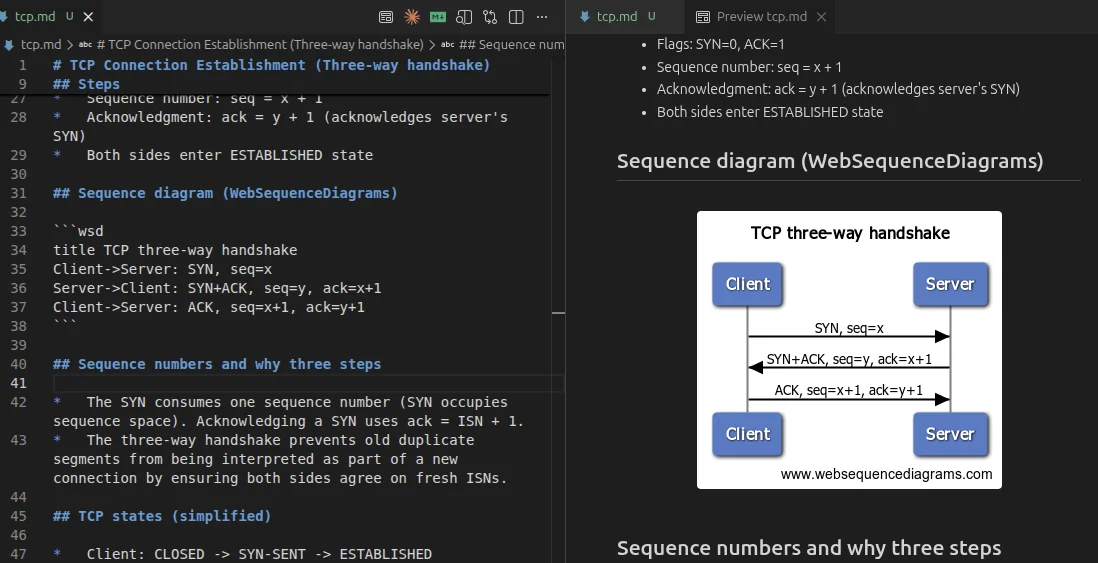
As you type, the layout engine redraws the diagram in real-time. Because our core rendering logic is exceptionally lean, it doesn't spin up your laptop fans or chew through your RAM like a bloated browser tab. It just calculates the optimal spacing and draws the SVG instantly.
MCP Server for LLMs
As a bonus, after you install the extension your LLMs will know how to write sequencediagrams too, right in the chat. Ask them to draw one, and they will.
You can grab the extension right now by clicking here or searching for "WebSequenceDiagrams" in the VS Code Marketplace. Give it a try, and let me know how much time it saves you from touching your mouse or whiteboard markers.

Comments